Staff Sign-In Options

Your staff can check patients into your office at any Edge Cloud computer station, using one of several sign in methods.

Your patients can also check themselves in from a dedicated Patient Sign In station. (See "Patient Sign-In" for details.)

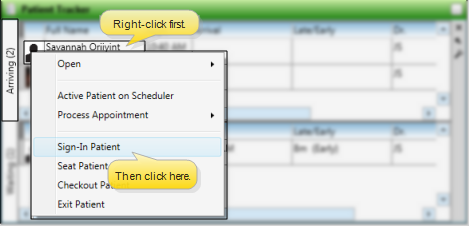
Sign In Patient / Update Patient Tracker From Scheduler - Right-click an appointment in your schedule and select Patient Tracker. You can then sign a patient into your office, update the Patient Tracker status, and exit the patient. See "Patient Tracker" for details. The current Patient Tracker status is displayed at the bottom of the patient's appointment for your reference.
More Information

Alert Bypass - Alerts and appointment messages are not issued when the patient is not signed in via the Patient Sign In screen. See "Patient Sign-In" for details.

Sign-In Icons - Once a patient signs into your Patient Tracker system, your scheduling screen indicates the operatory status of that appointment. (See "Your Scheduler" for details.)